
Oracle ERP Intercompany Why It's Harder Than It Looks
Intercompany is one of the hardest financial plumbing problems in ERP. A single transaction has to flow cleanly across operating units, post correctly to multiple sub-ledgers, and net to zero in consolidation — and all of that depends on the setup being right.
This post is for anyone who designs, configures, or troubleshoots these flows. I'll walk through what intercompany is, the three most common types and when each applies, why it's genuinely hard, how to validate your setup, and how we cut 67% of the steps out of the worst part using Oracle APEX. 👊🏼 🏆 💪🏼
3 Key Takeaways ✍️
Oracle ERP supports numerous intercompany types. Choose the wrong one for your scenario and the accounting, inventory, and operational problems will compound quietly, sometimes for years. This is painful to unwind.
The most common intercompany GL failure is not a missing setup, but a wrong pointer. One misconfigured Transaction Type reference cascades into multiple wrong accounts across AR, AP, and the GL at the same time. You won't see it until you run the full cycle and trace back the actual entries.
Intercompany elimination only works if IC Receivable, IC Payable, IC Revenue, and IC COGS are on dedicated, segregated accounts. Mix them with your external AR/AP and sales accounts and elimination becomes a manual exercise every single period.
What Intercompany Is and Why It Exists
When two operating units (OUs) or legal entities inside the same parent company buy or sell from each other, those transactions still have to look "arm's length" on each entity's books — as if they were dealing with an outside, unrelated company.
So one OU ships the product and records a receivable and revenue. The other receives it and records a payable and inventory cost. Two separate companies, two separate sets of books.
Here's the elegant part: at consolidation, it all zeros out. IC Receivable nets against IC Payable. IC Revenue nets against IC COGS.
That's the theory at least. But here's why it is harder in practice.
Three Types of Intercompany
This is where most implementations stumble. They treat intercompany as a sole concept and configure it generically. In Oracle ERP, both R12 and Fusion, there are over seven distinct types. Each one triggers different accounting flows, setup dependencies and operational behaviors. I highlight the most commonly used below.
1. Internal Requisition / Internal Sales Order (IR/ISO) (also referred to as Transfer Orders)
This is used for inventory replenishment across operating units. For example, if one OU needs stock, the other ships it. The receiving OU creates an Internal Requisition. The ERP converts it to an Internal Sales Order in the shipping OU. The shipping OU picks, packs, ships, and invoices the receiving OU at a transfer price through the IC invoicing programs.
This is the most common type in manufacturing and distribution environments.
2. External Drop Ship
A customer-facing sales order is fulfilled directly by an external supplier who ships to the customer. The OU does not need to touch the inventory. Intercompany accounting flows through the purchase order receipt instead of the sales order shipment.
3. Internal Drop Ship
A customer-facing sales order is fulfilled by another internal operating unit, which ships directly to the end customer. The selling OU books the external sale and owns the customer relationship. The fulfilling OU ships the product and invoices the selling OU at transfer price.
Two sets of books. Two margins. One shipment to the end customer.
⚠️ The distinction between Type 1 and Type 3 matters more than most teams realize. In Type 1, the receiving OU is the end customer. In Type 3, there is an external customer beyond the receiving OU. The shipping network configuration, the Intercompany price list, and the revenue recognition events are all different. Careful with the configuration.
Why Intercompany Is Genuinely Hard
1. It's a chain, not a form.
Intercompany is one of the more complex cross-module configurations in ERP — it touches at least seven modules before a single transaction posts: inventory, costing, order management, receivables, tax, payables and accounting.
Intercompany accounting in Oracle ERP is driven by a sequence of interdependent setups: the Intercompany (IC) Relations configuration, the shipping network, the OM Transaction Type, Sub-ledger Accounting (SLA) rules, the AP setup in the receiving OU, and the IC price list. Each one feeds the next.
A mistake at any point in the chain shows up silently in the GL output. There is no single "intercompany setup" screen. It is spread across Inventory, Order Management, Receivables, Payables, General Ledger, etc. You have to understand all modules to trace it correctly.
2. The errors do not throw out error messages.
Unlike a missing required field that throws a validation error, a wrong account configuration in intercompany does not stop the process. The IC programs run. The invoices get created. The GL entries post. Just to the wrong accounts.
On a recent engagement, we ran the IC cycle end-to-end. It completed without a single error message. When we pulled Account Inquiry, we found IC revenue posting to an external sales account and IC payables hiding inside an inventory accrual account. Nothing broke. Everything was just pointing to the wrong place.
3. The return leg is almost always an afterthought.
Most teams configure the outbound IC flow and then discover at the first return that the return path uses a different network that does not trigger IC invoicing. Outbound and return shipping networks are frequently asymmetric. Design the return flow before go-live.
The Validation Checklist
The only way to know your intercompany setup is correct is to run the full IC cycle in a test environment and trace the actual GL entries. Here is what to look for:
Amounts match. The IC AR invoice amount in the shipping OU must equal the IC AP invoice amount in the receiving OU, both at the transfer price from the IC price list. Any difference indicates a setup or perhaps a timing issue.
Accounts are correct. Trace every entry in GL Account Inquiry. Compare what actually posted against what's configured in IC Relations and the SLA. If they don't match, investigate the full chain.
Currency and FX rate. If the IC invoice is in a different currency than the functional currency of either set of books, verify that the conversion rate matches what your IC Currency Conversion profile option specifies. FX mismatches create reconciliation differences that are hard to find.
Same GL period. The AR and AP entries must post in the same accounting period. Timing differences, such as where the AR side posts in period 1 and the AP side posts in period 2, create reconciliation issues for that period.
Dedicated IC accounts throughout. IC Receivable must be segregated from external AR. IC Payable must be segregated from external AP. IC Revenue must be segregated from third-party sales. IC COGS must have its own account. Mixing any of these with external accounts makes elimination a manual analysis exercise every single time.
Elimination-ready. IC Receivable (shipping OU) + IC Payable (receiving OU) must net to zero. IC Revenue (shipping OU) + IC COGS (receiving OU) must net to zero.
Any non-zero balance on that last check is a reconciliation gap that will surface up at time of consolidation. ⚠️ Historical entries accumulate fast. If your IC cycle goes live with wrong accounts, every transaction posts to the wrong GL accounts from day one. The longer it runs wrong, the larger the reclassification project.
What We Automated and Why It Mattered
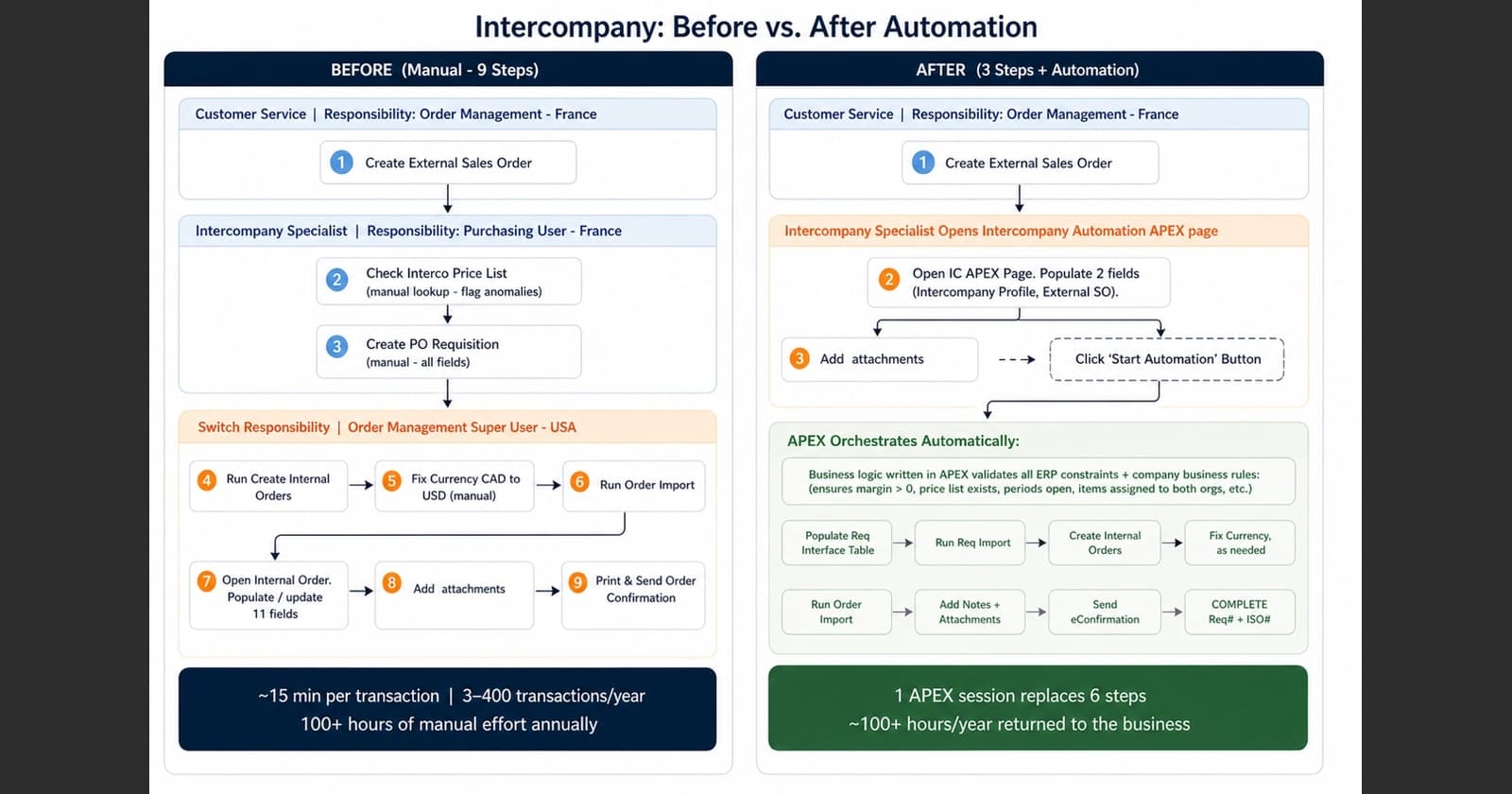
A recent client's manual intercompany process was painful. The Intercompany Specialist had to log into multiple EBS responsibilities, create a PO Requisition by hand, run "Create Internal Orders," then open the Order Import Corrections form just to fix the currency. From there, it was back into the Internal Sales Order to populate a dozen header and line fields, attach three document types, and trigger an eConfirmation. This is a fragment of the many steps required. With 300 to 400 transactions per year at roughly 15-20 minutes each, that's over 100 hours of repetitive, error-prone work annually. We built an APEX automation to collapse most of it into a single APEX session.

ERP Features We Leveraged
The solution is built entirely on standard Oracle IC programs: Requisition Import, Create Internal Orders, and Order Import all run as designed. What we built on top was a PL/SQL orchestration layer that 1) populates the interface tables, 2) fires each concurrent program in sequence, 3) waits for each to complete, 4) validates the output, and then moves to the next step. A single custom concurrent program, "XX Launch Intercompany Process," controls the whole chain.
We came up with the concept of Intercompany Profiles - to capture setups by intercompany scenario - by customer, OU, LE, and/or intercompany type. Each profile stores pre-defined values - OU, org, subinventory, price list, currency, shipping method, FOB, freight terms so that each new transaction starts pre-configured. Two Descriptive Flexfields on the Requisition Header and Lines carry the External SO traceability IDs throughout the entire chain.
"Set it once, use it very time."

What APEX Contributed
EBS forms can't do what APEX does here. The specialist has a single APEX webpage to navigate to and work with. They pick a profile, select the External Sales Order from a filtered list, and immediately, APEX displays populated fields for review before submission. For example, if there's a negative margin on the order, they can email for approval directly from the APEX app before submitting.


Once submitted, a progress tracker shows each concurrent program firing and completing in real time.


The log file, below, for the main controller Concurrent Program, 'Launch Intercompany Process' (shown above), includes details of each step taken during the Intercompany Automation Process. It also includes the Requisition Number and Internal Sales Order Number created by the process and status of uploaded attachments.

Closing Thoughts
The concepts discussed here, the distinct Intercompany types, the tricky chain-of-dependency failure pattern and the validation approach above, apply regardless of which Oracle ERP version you are on (R12 or Fusion). The specific configurations, tables, and sub-ledger accounting behavior vary by version and deserve their own treatment. But get the concepts right first. Then you can focus on the version-specific execution. Have Fun!
As always, reach out and let me know how your intercompany design goes. I'd love to hear what you find. 🙏